> ## Documentation Index
> Fetch the complete documentation index at: https://docs.invopop.com/llms.txt
> Use this file to discover all available pages before exploring further.
# ZATCA supplier registration in Saudi Arabia
> Onboard a Saudi VAT-registered party with ZATCA and provision its production CSID.
Registration is required for any Saudi VAT number that will clear or report invoices through Invopop. It is a prerequisite for the [clearance and reporting](/guides/sa-zatca-clearance-reporting) flow.
## Sandbox environments
In sandbox, the **Register Party** step's configuration selects which ZATCA portal to onboard against. Production enrollments ignore this and always use the live endpoint.
| Mode | Target | OTP in the wizard | Use it to |
| ---------------------- | -------------------------------- | --------------------------------------------------------------------------- | ----------------------------------------------------------------------------------------------------- |
| `developer` | ZATCA Developer (sandbox) portal | **Dummy** — any placeholder value is accepted | Test the onboarding flow end to end without touching a real ZATCA account. |
| `simulation` (default) | ZATCA Simulation portal | **Real** — must be generated from the supplier's FATOORA Simulation account | Rehearse the production onboarding with genuine certificates and compliance checks before going live. |
The two modes target different ZATCA sandbox endpoints and differ mainly in how the OTP is treated:
* **Developer** is the lightweight sandbox. ZATCA does not validate the OTP, so the value the supplier types in the [onboarding wizard](#the-onboarding-wizard) is a dummy.
You can **register any party** in developer mode, but ZATCA only accepts **invoices issued from its fixed test VAT number, `399999999900003`**.
* **Simulation** mirrors production. The OTP must be a **real** one-time password the supplier generates from their FATOORA *Simulation* portal, exactly as they would in production.
In both sandbox modes the supplier still completes the same wizard, only the OTP requirement changes.
## How it works
Registration spans two parts: a workflow you run against the party document, and a hosted onboarding wizard the supplier completes to provide the FATOORA OTP.
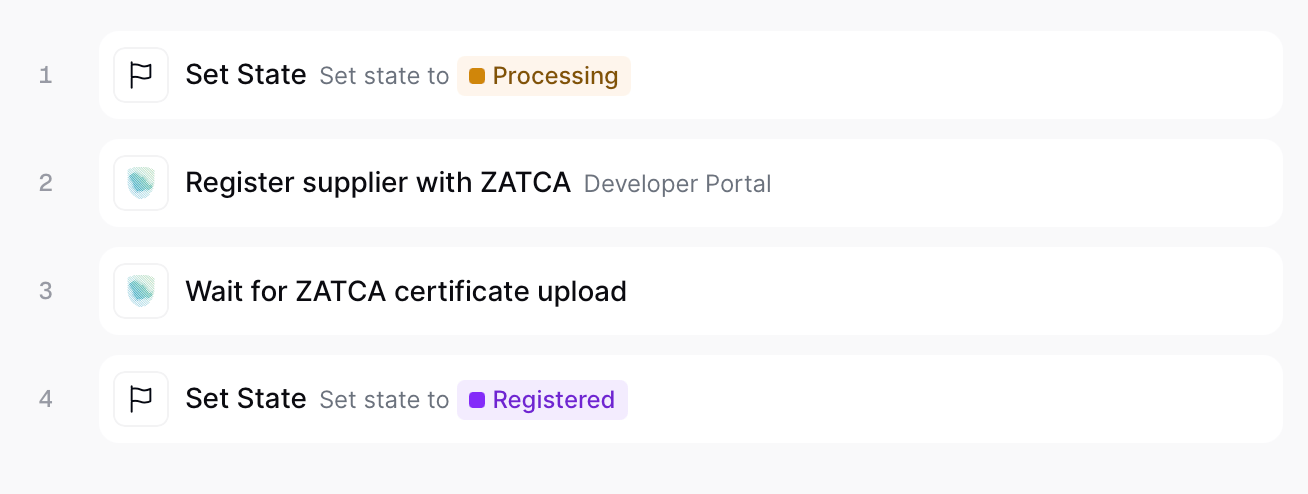 Sets the state of the silo entry as "Processing".
Validates the party's identity and full address, then publishes a public onboarding link in the meta section of the party. The supplier follows this link to complete the onboarding wizard.
Pauses until the supplier uploads the compliance CSID. It will then submit the mandatory compliance sample invoices and swaps the Compliance CSID with the Production CSID.
Sets the state of the silo entry as "Registered".
Publishes the ZATCA onboarding link and provisions the party's production CSID.
Copy and paste into a new [Empty Party workflow](https://console.invopop.com/redirect/workflows/new?template=empty-party).
```json Register supplier in ZATCA theme={"system"}
{
"name": "ZATCA register supplier",
"description": "",
"schema": "org/party",
"steps": [
{
"id": "f60b2e30-6fce-11f1-b09d-79f60b032746",
"name": "Set state",
"provider": "silo.state",
"summary": "Set state to `processing`{.state .processing}",
"config": {
"state": "processing"
}
},
{
"id": "fd448bb0-6fce-11f1-b09d-79f60b032746",
"name": "Register supplier with ZATCA",
"provider": "gov-sa.party.register",
"summary": "Developer Portal",
"config": {
"mode": "developer"
}
},
{
"id": "0064b770-6fcf-11f1-b09d-79f60b032746",
"name": "Wait for ZATCA OTP authorization",
"provider": "gov-sa.wait.authorization"
},
{
"id": "0236df60-6fcf-11f1-b09d-79f60b032746",
"name": "Set state",
"provider": "silo.state",
"summary": "Set state to `registered`{.state .registered}",
"config": {
"state": "registered"
}
}
],
"rescue": [
{
"id": "04aa0240-6fcf-11f1-b09d-79f60b032746",
"name": "Set state",
"provider": "silo.state",
"summary": "Set state to `error`{.state .error}",
"config": {
"state": "error"
}
}
]
}
```
## The onboarding wizard
The link published by **Register Party** provides an onboarding wizard for the supplier to complete:
Sets the state of the silo entry as "Processing".
Validates the party's identity and full address, then publishes a public onboarding link in the meta section of the party. The supplier follows this link to complete the onboarding wizard.
Pauses until the supplier uploads the compliance CSID. It will then submit the mandatory compliance sample invoices and swaps the Compliance CSID with the Production CSID.
Sets the state of the silo entry as "Registered".
Publishes the ZATCA onboarding link and provisions the party's production CSID.
Copy and paste into a new [Empty Party workflow](https://console.invopop.com/redirect/workflows/new?template=empty-party).
```json Register supplier in ZATCA theme={"system"}
{
"name": "ZATCA register supplier",
"description": "",
"schema": "org/party",
"steps": [
{
"id": "f60b2e30-6fce-11f1-b09d-79f60b032746",
"name": "Set state",
"provider": "silo.state",
"summary": "Set state to `processing`{.state .processing}",
"config": {
"state": "processing"
}
},
{
"id": "fd448bb0-6fce-11f1-b09d-79f60b032746",
"name": "Register supplier with ZATCA",
"provider": "gov-sa.party.register",
"summary": "Developer Portal",
"config": {
"mode": "developer"
}
},
{
"id": "0064b770-6fcf-11f1-b09d-79f60b032746",
"name": "Wait for ZATCA OTP authorization",
"provider": "gov-sa.wait.authorization"
},
{
"id": "0236df60-6fcf-11f1-b09d-79f60b032746",
"name": "Set state",
"provider": "silo.state",
"summary": "Set state to `registered`{.state .registered}",
"config": {
"state": "registered"
}
}
],
"rescue": [
{
"id": "04aa0240-6fcf-11f1-b09d-79f60b032746",
"name": "Set state",
"provider": "silo.state",
"summary": "Set state to `error`{.state .error}",
"config": {
"state": "error"
}
}
]
}
```
## The onboarding wizard
The link published by **Register Party** provides an onboarding wizard for the supplier to complete:
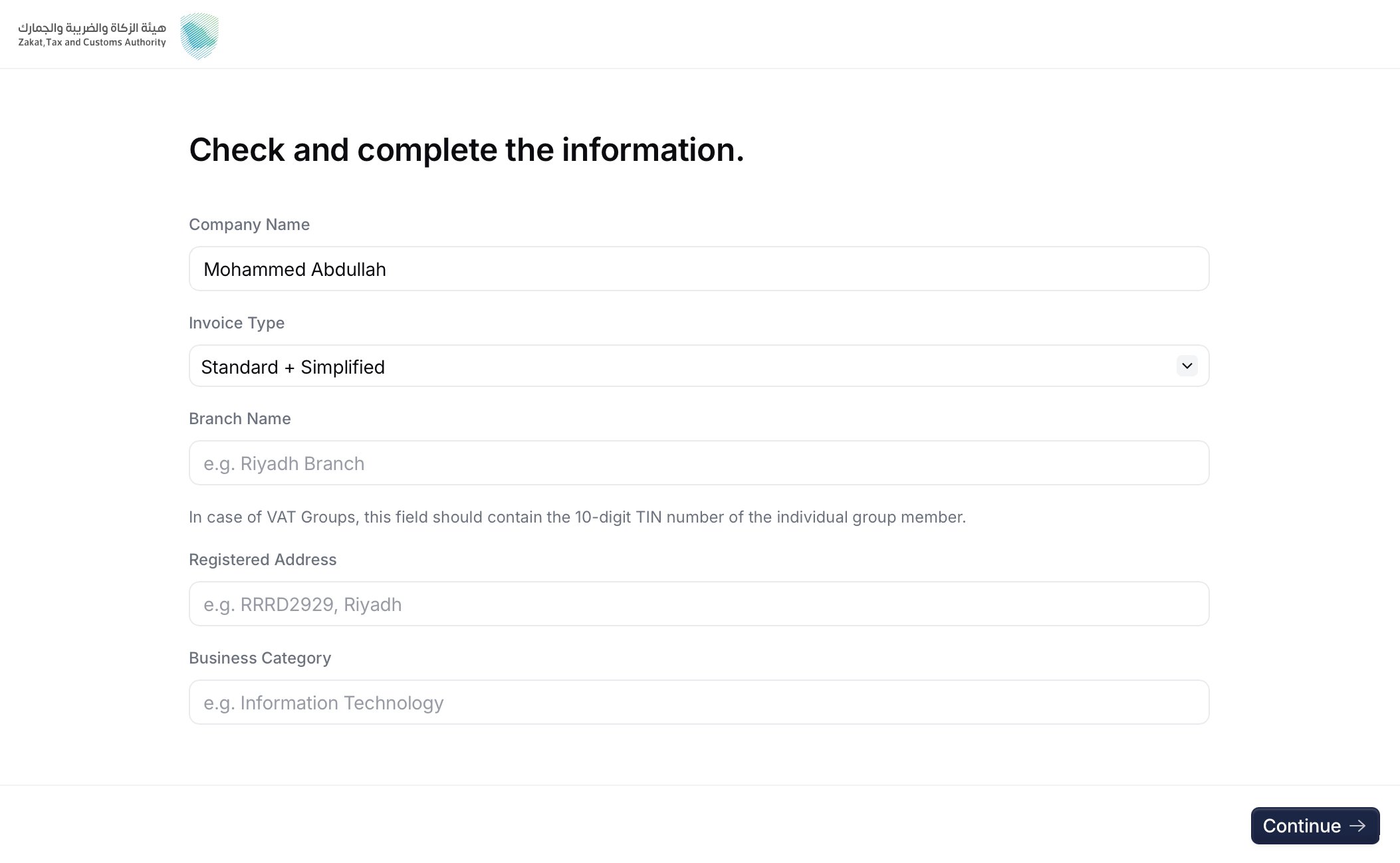 The supplier confirms the legal name and provides the **invoice type** (`1000` standard, `0100` simplified, or `1100` both), **branch name**, **registered address**, and **business category**. These values feed the certificate request.
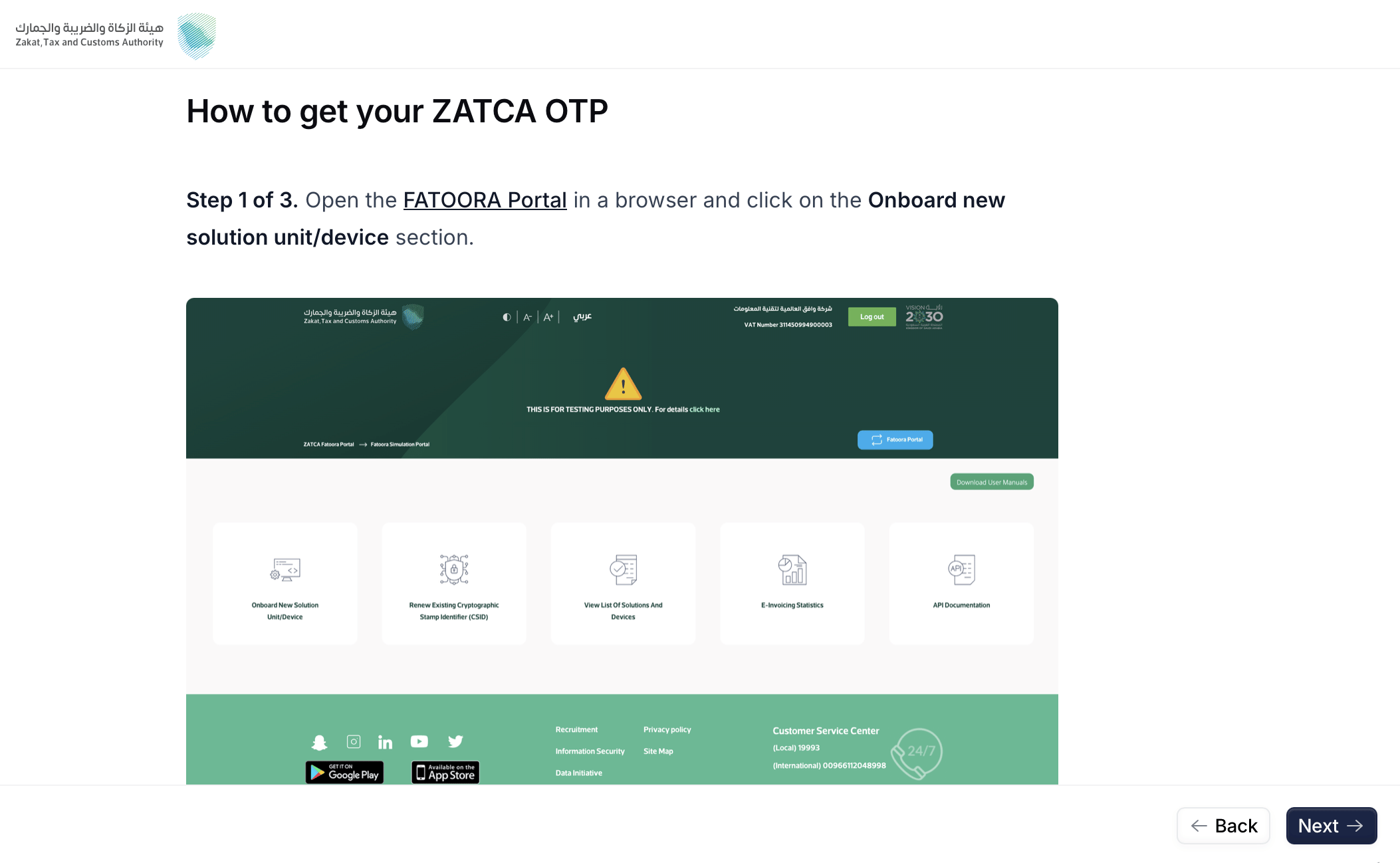 The supplier signs in to the FATOORA portal and generates a One-Time Password for the EGS unit. The wizard shows the relevant FATOORA screens.
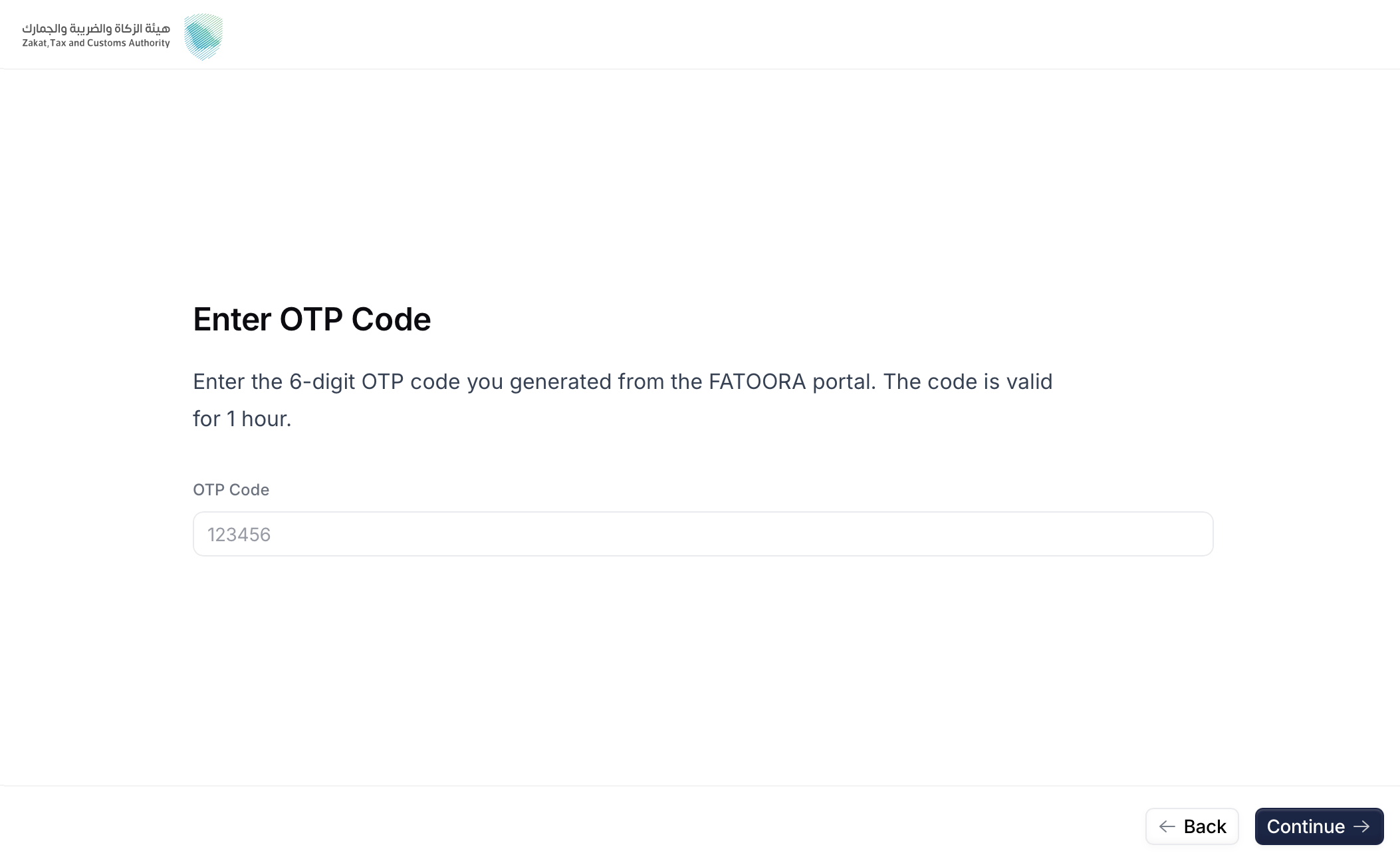 The supplier pastes the OTP and reviews the recap of the details that will be sent to ZATCA.
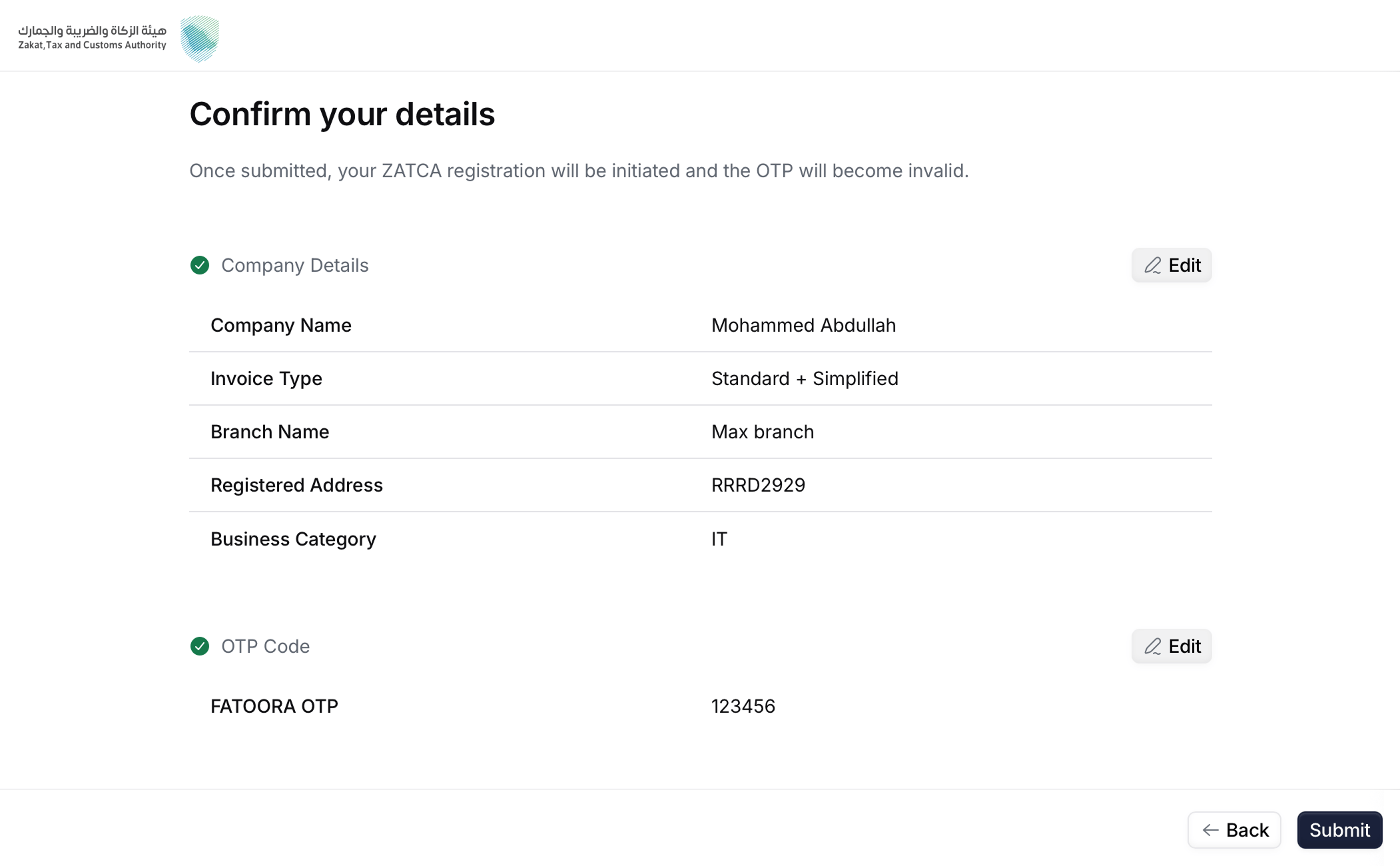 Here you will make sure all the details you entered were correct. Click "Back" if you need to change anything.
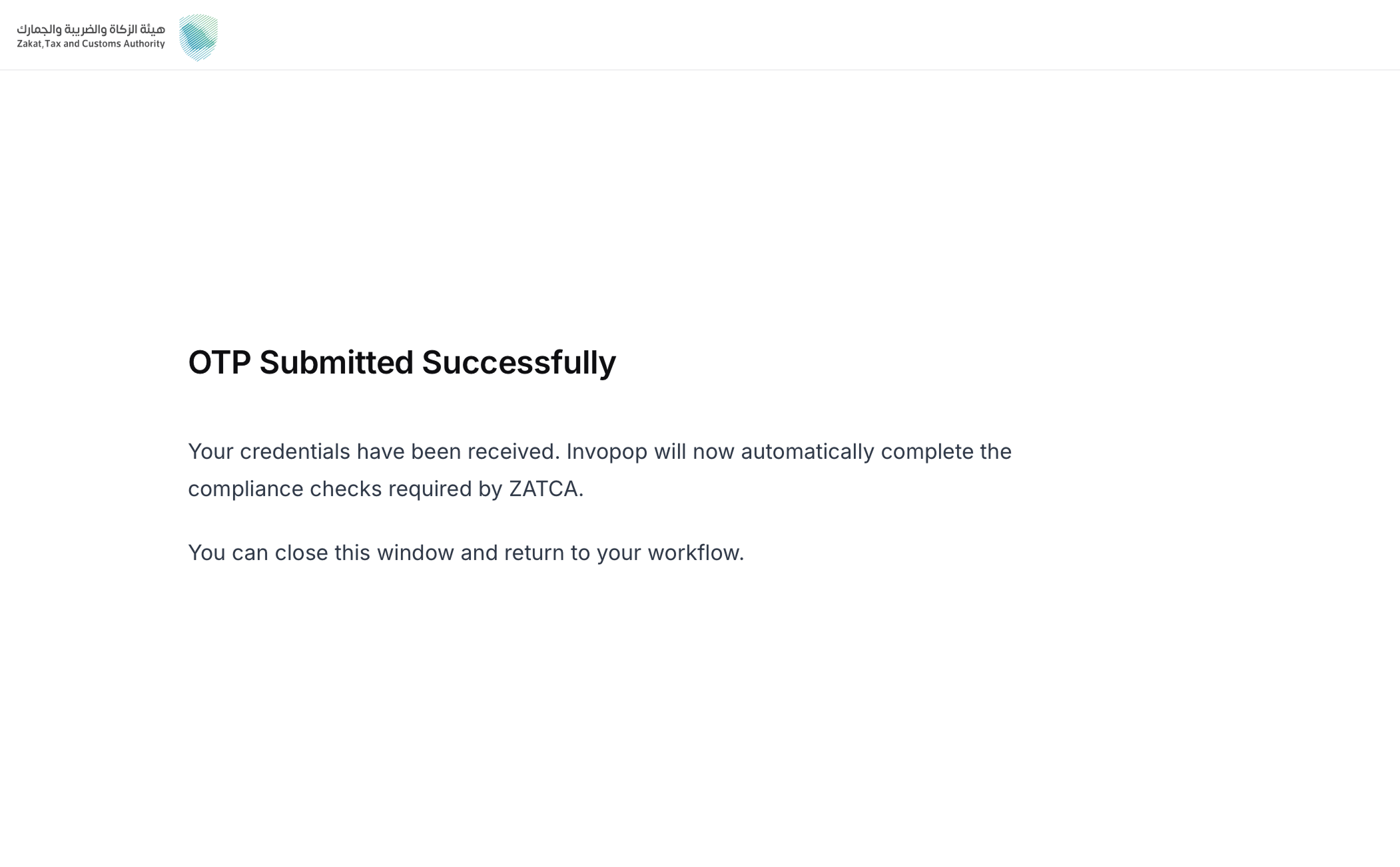 Upon submit, Invopop requests the **Compliance CSID**, and stores the credentials. This unblocks the **Wait for Authorization** step in the workflow.
The invoice type chosen here determines which compliance samples Invopop submits: `1000` runs standard tax invoices, credit notes, and debit notes; `0100` runs the simplified equivalents; `1100` runs both sets.
## Unregistration (sandbox only)
Unregistering a party from ZATCA in production environment is handled by the **tax payers**, directly in the **FATOORA portal**, signing in with their own credentials.
Invopop also provides an unregister action that removes the party and its stored credentials from **Invopop's internal systems only**. It does not touch the party's registration with ZATCA.
This action is intended for **testing in sandbox** — for example, to re-onboard the same VAT during development. It is **not** for live environments; unregistering at ZATCA is always done by the tax payer in the FATOORA portal.
Removes the party's registration and stored credentials from Invopop's internal systems.
Copy and paste into a new [Empty Party workflow](https://console.invopop.com/redirect/workflows/new?template=empty-party).
```json Unregister supplier in ZATCA theme={"system"}
{
"name": "ZATCA unregister supplier",
"description": "Removes a supplier's registration from Invopop's internal systems",
"schema": "org/party",
"steps": [
{
"id": "572ac450-6fcf-11f1-b09d-79f60b032746",
"name": "Set state",
"provider": "silo.state",
"summary": "Set state to `processing`{.state .processing}",
"config": {
"state": "processing"
}
},
{
"id": "5c0e9910-6fcf-11f1-b09d-79f60b032746",
"name": "Unregister supplier from ZATCA",
"provider": "gov-sa.party.unregister"
},
{
"id": "5e800e40-6fcf-11f1-b09d-79f60b032746",
"name": "Set state",
"provider": "silo.state",
"summary": "Set state to `void`{.state .void}",
"config": {
"state": "void"
}
}
],
"rescue": [
{
"id": "60e4d940-6fcf-11f1-b09d-79f60b032746",
"name": "Set state",
"provider": "silo.state",
"summary": "Set state to `error`{.state .error}",
"config": {
"state": "error"
}
}
]
}
```
## FAQ
A workspace with the **Saudi Arabia** app enabled, and an `org/party` (the supplier) carrying:
* a Saudi **VAT registration number**,
* an **identity** of type `CRN`, `MOM`, `MLS`, `700`, `SAG`, or `OTH`, and
* a complete **national address** (building number, postal code, district, street, additional street, and country).
During the hosted onboarding wizard the supplier also provides the legal name, invoice type (`1000` standard / `0100` simplified / `1100` both), branch name, registered address, and business category — plus the FATOORA OTP.
**1 hour** from when it is generated in the FATOORA portal. If it expires, generate a new one and re-enter it in the wizard.
In **Developer** mode the OTP is not validated (any placeholder works) and you can only send invoices from ZATCA's fixed test VAT `399999999900003`. In **Simulation** mode the OTP must be real and you can send from any registered party.
No. Simulation requires a real FATOORA account and taxpayer to generate a valid OTP. Use **Developer** mode if you want to test the flow without a real account.
More available in our [Saudi Arabia FAQ](/faq/saudi-arabia) section.
***
| | |
| ---------- | --------------------------------------------------------------------------------------------------------------------------------------------------------------------------------------------------------------------------------------------- |
| Compliance | [Invoicing compliance in Saudi Arabia](/compliance/saudi-arabia)
Upon submit, Invopop requests the **Compliance CSID**, and stores the credentials. This unblocks the **Wait for Authorization** step in the workflow.
The invoice type chosen here determines which compliance samples Invopop submits: `1000` runs standard tax invoices, credit notes, and debit notes; `0100` runs the simplified equivalents; `1100` runs both sets.
## Unregistration (sandbox only)
Unregistering a party from ZATCA in production environment is handled by the **tax payers**, directly in the **FATOORA portal**, signing in with their own credentials.
Invopop also provides an unregister action that removes the party and its stored credentials from **Invopop's internal systems only**. It does not touch the party's registration with ZATCA.
This action is intended for **testing in sandbox** — for example, to re-onboard the same VAT during development. It is **not** for live environments; unregistering at ZATCA is always done by the tax payer in the FATOORA portal.
Removes the party's registration and stored credentials from Invopop's internal systems.
Copy and paste into a new [Empty Party workflow](https://console.invopop.com/redirect/workflows/new?template=empty-party).
```json Unregister supplier in ZATCA theme={"system"}
{
"name": "ZATCA unregister supplier",
"description": "Removes a supplier's registration from Invopop's internal systems",
"schema": "org/party",
"steps": [
{
"id": "572ac450-6fcf-11f1-b09d-79f60b032746",
"name": "Set state",
"provider": "silo.state",
"summary": "Set state to `processing`{.state .processing}",
"config": {
"state": "processing"
}
},
{
"id": "5c0e9910-6fcf-11f1-b09d-79f60b032746",
"name": "Unregister supplier from ZATCA",
"provider": "gov-sa.party.unregister"
},
{
"id": "5e800e40-6fcf-11f1-b09d-79f60b032746",
"name": "Set state",
"provider": "silo.state",
"summary": "Set state to `void`{.state .void}",
"config": {
"state": "void"
}
}
],
"rescue": [
{
"id": "60e4d940-6fcf-11f1-b09d-79f60b032746",
"name": "Set state",
"provider": "silo.state",
"summary": "Set state to `error`{.state .error}",
"config": {
"state": "error"
}
}
]
}
```
## FAQ
A workspace with the **Saudi Arabia** app enabled, and an `org/party` (the supplier) carrying:
* a Saudi **VAT registration number**,
* an **identity** of type `CRN`, `MOM`, `MLS`, `700`, `SAG`, or `OTH`, and
* a complete **national address** (building number, postal code, district, street, additional street, and country).
During the hosted onboarding wizard the supplier also provides the legal name, invoice type (`1000` standard / `0100` simplified / `1100` both), branch name, registered address, and business category — plus the FATOORA OTP.
**1 hour** from when it is generated in the FATOORA portal. If it expires, generate a new one and re-enter it in the wizard.
In **Developer** mode the OTP is not validated (any placeholder works) and you can only send invoices from ZATCA's fixed test VAT `399999999900003`. In **Simulation** mode the OTP must be real and you can send from any registered party.
No. Simulation requires a real FATOORA account and taxpayer to generate a valid OTP. Use **Developer** mode if you want to test the flow without a real account.
More available in our [Saudi Arabia FAQ](/faq/saudi-arabia) section.
***
| | |
| ---------- | --------------------------------------------------------------------------------------------------------------------------------------------------------------------------------------------------------------------------------------------- |
| Compliance | [Invoicing compliance in Saudi Arabia](/compliance/saudi-arabia)
[Compliance timeline](/timelines/saudi-arabia) |
| Apps | [Saudi Arabia](/apps/saudi-arabia) |
| Guides | [Registration](/guides/sa-zatca-registration)
[Clearance & Reporting](/guides/sa-zatca-clearance-reporting) |
| FAQ | [Saudi Arabia FAQ](/faq/saudi-arabia) |
| GOBL | [Saudi Arabia Tax Regime](https://docs.gobl.org/regimes/sa)
[ZATCA Addon](https://docs.gobl.org/addons/sa-zatca-v1) |
| GitHub | [gobl.sa.zatca](https://github.com/invopop/gobl.sa.zatca) |
Ask and answer questions about invoicing in Saudi Arabia →